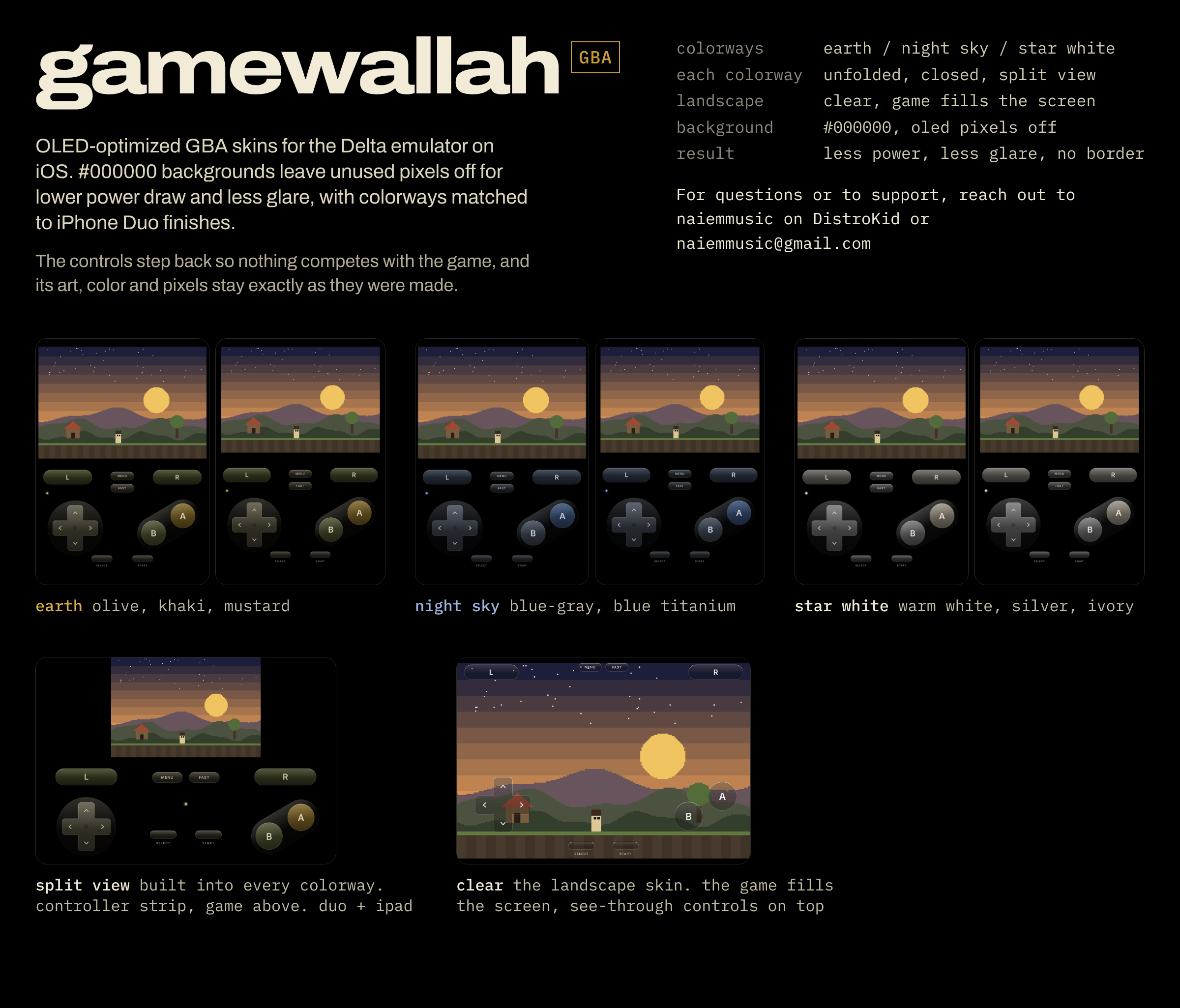
Hi there, naiem here. Here are my OLED-optimized iPhone Duo GBA skins for the Delta emulator on iOS. #000000 backgrounds leave unused pixels off for lower power draw and less glare, with colorways matched to iPhone Duo finishes. The goal is less strain on your eyes, a subtle nod to iOS design elements, and a clean focus on the games you play at hand.
The controls step back so nothing competes with the game, and its art, color and pixels stay exactly as they were made.
Colorways: Earth, Night Sky, Star White
• Earth (naiem's favorite): olive, khaki, mustard
• Night Sky: blue-gray, blue titanium
• Star White: warm white, silver, ivory
Each colorway skin includes:
• Unfolded: inner display, portrait
• Closed: outer display, portrait, with a larger 3:2 game screen. Delta switches automatically when you open or fold the Duo.
• Split View: a slim controller strip with the game screen above it, on the Duo and on iPad
Landscape: Clear
One skin, no colorway. The game fills the whole screen and the controls sit on top as see-through glass. Works unfolded and closed.
How to set it up in Delta
Portrait and Split View: pick a colorway. Landscape: pick Clear.
Design
• Pure #000000 background, so OLED pixels stay off
• Less power, less glare, no screen border
• Flat, semi-transparent glass controls, low-contrast so they stay out of the way
• D-pad, A/B, L/R, Start/Select, Menu and Fast Forward, with touch areas matched to the drawn buttons
All four skins install side by side.
For questions, reach out to naiemmusic on DistroKid or naiemmusic@gmail.com. Feel free to messsage me on Reddit as well, or just say hi and share creative interests!
If you'd like to support, i'd greatly appreciate it and it goes towards my creative endeavors and health. ☕️
Much love.
Comments
Please log in to leave a comment.